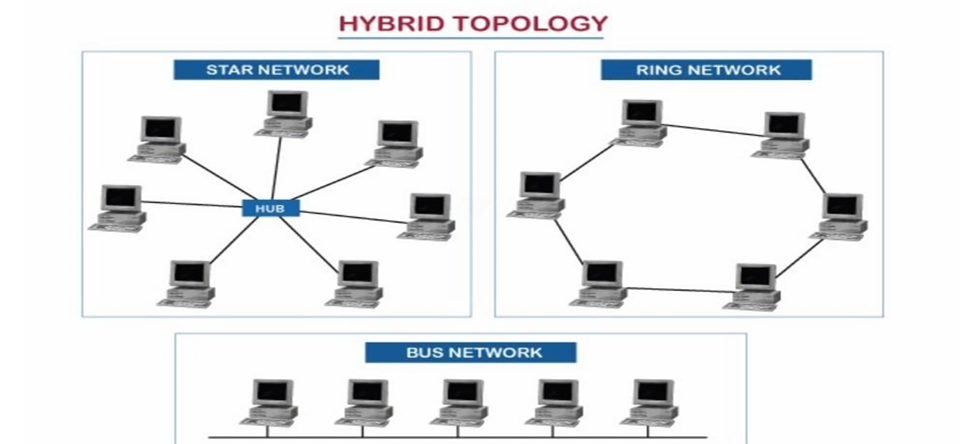
First, there is a need to understand what network topology is all about. It simply refers to the arrangement of devices in a computer network.
-As explained in our previous article, a computer network is a collection of interconnected devices that can communicate and share resources.
-So topology is the pattern inwhich these devices are arranged to enable communication and share resources in a network.
-It also shows how devices in a network are connected and how data flows between them.
This helps to understand the physical and logical structure of networks. Networks can be connected in the following topologies:
i)BUS TOPOLOGY
ii)RING TOPOLOGY
iii)STAR TOPOLOGY
iv)MESH TOPOLOGY
v)TREE TOPOLOGY
vi)HYBRID TOPOLOGY
i)BUS TOPOLOGY: This is simply a situation where the devices in the network are designed in such a way that all nodes(another name for devices on a network) are connected through a single cable known as the BACKBONE CABLE. If a single device sends a message in a bus topology, the message gets to all connected nodes. Some of its features include simplicity, with data travelling in both directions. The major disadvantage is that if the single cable fails, the network goes down automatically.
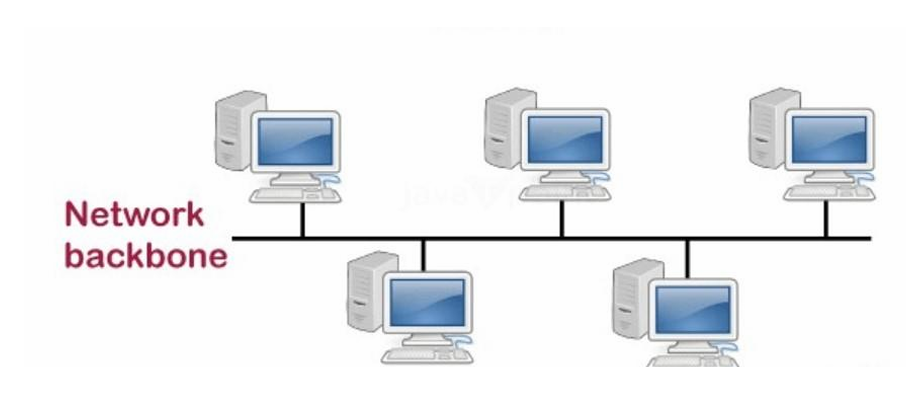 From the image above, you can see that all devices are connected to a simple central cable(The Bus).
ii)RING TOPOLOGY: From the name ring, this means arrangement in a circular form like a ring. It is when the devices are connected in a circular fashion, where each device is connected to two others to form a ring. In this connection, data travels in one direction, and the major disadvantage is that once a device fails, it disrupts the whole network.
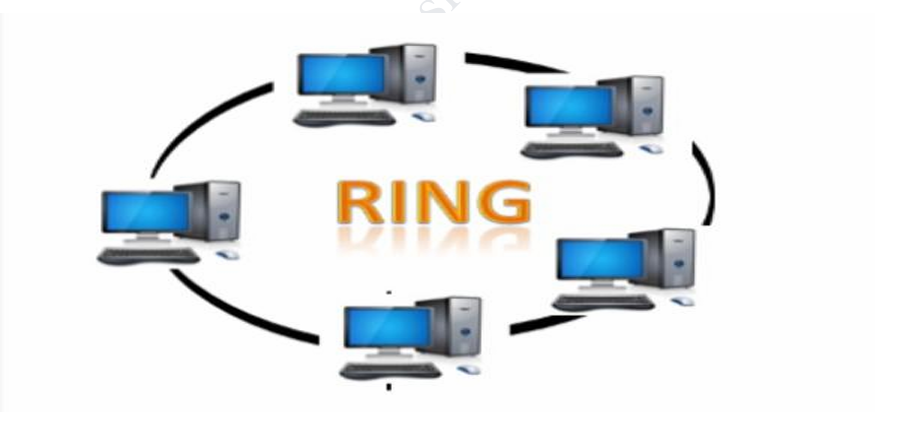
From the image above, you can see that all devices are connected in a circular form, making it a unidirectional network without an end.
iii)STAR TOPOLOGY: In this arrangement, all nodes are connected to a central device, which could be a hub, switch or central computer, using a point-to-point connection. The central device is known as the server, and the peripheral devices attached to the server are known as clients. It is easy to install, and a single point of failure does not affect the entire network like in ring topology, but its major disadvantage is that if the central device goes down, then the entire network goes down too.
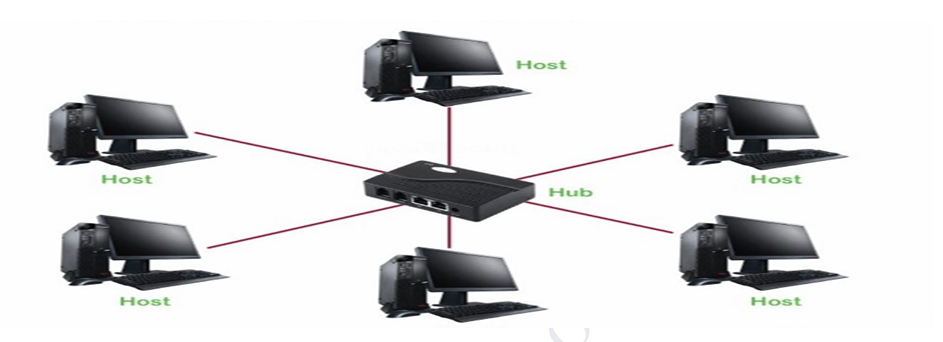
From the picture above, you can see that all devices are connected to a central device, which in this case is a central hub. It forms a kind of star shape, which brings about its name.
iv)MESH TOPOLOGY: In this arrangement, every device is connected to every other device in the network. They are interconnected with each other through variousredundant connections. This topology is mainly used for wireless networks. This topology is highly reliable but very expensive and complex due to the many connections.
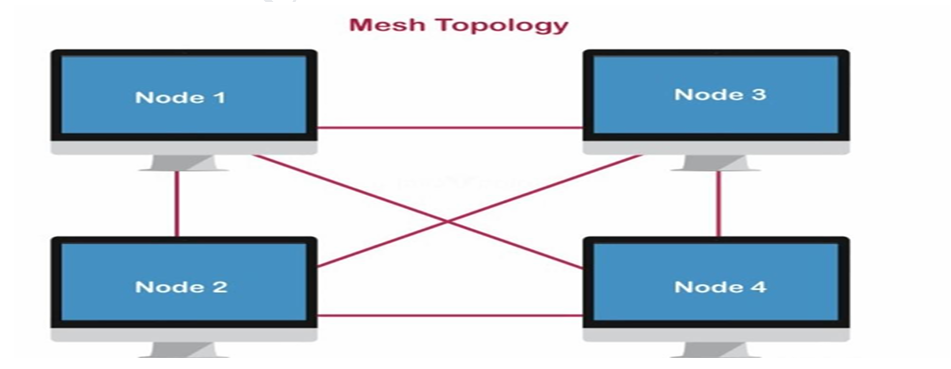
From the image above, you can see that all devices on the network are interconnected.
v)TREE TOPOLOGY: This is a hybrid topology that combines characteristics of star and bus topologies. In this arrangement, all nodes are connected hierarchically. The top-most node in the tree topology is known as a root node, and all other nodes are descendants of the root node.
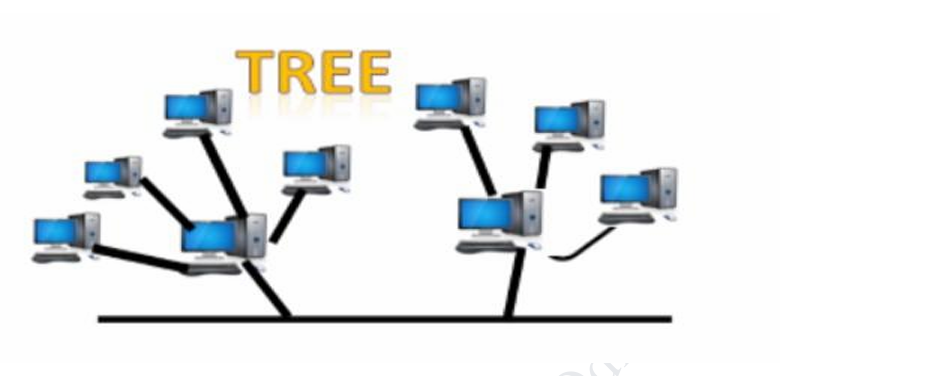
From the image above, you can see the star topology as well as the central cable used in bus topology.
vi)HYBRID TOPOLOGY: This is basically a combination of two or more topologies. It is a connection between different links and nodes to transfer the data. So, in other words, when two or more different topologies are combined, it is termed a Hybrid topology. This topology is good because it can be designed to meet specific network requirements, but is more complex to maintain.