
First, let me take you back to the core idea of what a network really is, so you can understand the foundation of this documentation. A network is a collection of interconnected devices that communicate and share resources with one another. In this framework, network devices exist to support and strengthen those connections, ensuring that communication between nodes flows smoothly and efficiently.
-Now, here’s a quick clarification worth noting: Network devices are indeed nodes, but not all nodes are network devices. In networking terms, a node is any device capable of sending, receiving, or forwarding data across a network. This includes everything from laptops and smartphones to servers and printers. Network devices, on the other hand, are a specialized class of nodes. These include routers, switches, firewalls, and other hardware designed specifically to
manage, route, or facilitate communication between other nodes.
-To explain further, network devices fall under intermediary nodes, which aredevices that facilitate the transmission of data between the source(sender) and the destination(receiver). Your laptop, phones and other devices fall under End
Nodes.
-Another key concept to understand in networking is the distinction between hosts and stations. A host refers to any device connected to a network via a wired connection, e.g., desktop computers, servers, or any Ethernet-enabled hardware. On the other hand, a station is a device that connects to the network wirelessly, such as smartphones and laptops using Wi-Fi.
Now that we’ve covered the foundational concepts, let’s dive into the core focus of this documentation: NETWORK DEVICES. Specifically, we’ll be exploring five key networking devices that function as intermediary nodes.
– For this discussion, we’ll be focusing on:
~ Repeaters
~ Hubs
~ Bridges
~ Switches
~ Routers
REPEATERS
A repeater is a simple yet essential network device used to extend the range of a network by amplifying or regenerating signals. As an intermediary node operating at the Physical Layer (Layer 1) of the OSI model, its job is straightforward but crucial. When a signal travels over a long distance, it naturally begins to weaken, often due to interference or physical limitations. A repeater steps in to capture the weakened signal, restore it to its original strength, and retransmit it to the next segment of the network. By doing so, repeaters help maintain signal integrity across larger network spans,
ensuring that data reaches its destination without degradation.
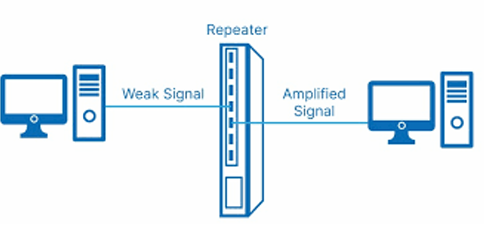
The Advantages of repeaters include being easy to install, cost-effective and maintaining signal integrity, while their disadvantages include no traffic filtering, limited to the physical layer and distance limitation.
HUBS
A hub is one of the most fundamental networking devices, commonly used to connect multiple devices within a Local Area Network (LAN). Like repeaters, hubs operate at the Physical Layer (Layer 1) of the OSI model and act as a central point for data transmission across connected devices. When a hub receives data from one device, it doesn’t analyse
or direct the traffic; instead, it simply broadcasts the data to all other connected devices, regardless of the intended recipient. This makes it a very basic form of network communication.
There are three main types of hubs:
● Passive Hub – Forwards signals as is, without amplification. Best suited for small, low-traffic networks.
● Active Hub – Amplifies or regenerates incoming signals before broadcasting, similar to a repeater.
● Intelligent Hub – Offers additional capabilities like remote management, monitoring, and configuration. Though largely replaced by switches today, they once bridged the gap between basic and smart networking.
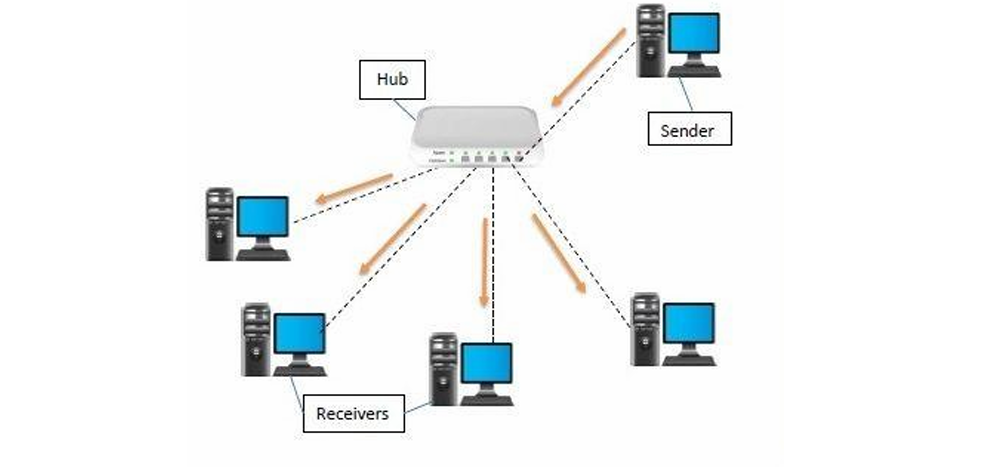
The Advantages of hubs include their simplicity, low cost, and ease of use for basic connectivity. Its disadvantages include shared bandwidth among all devices, no traffic filtering, Limited scalability and performance in larger networks.
BRIDGES
A network bridge is a device used to connect two or more network segments, typically within a Local Area Network (LAN), and forward traffic between them based on MAC addresses. It operates at the Data Link Layer (Layer 2) of the OSI model, making it more intelligent than hubs or repeaters. They are commonly used to connect separate LANs or to improve performance within a network by minimizing unnecessary traffic. Bridges help divide a large network into smaller, more manageable segments, which reduces traffic and enhances performance. Unlike hubs that blindly broadcast data,
bridges filter traffic by checking MAC addresses and forwarding data only to the appropriate segment. This selective forwarding makes communication more efficient, especially in networks where reducing congestion is critical.
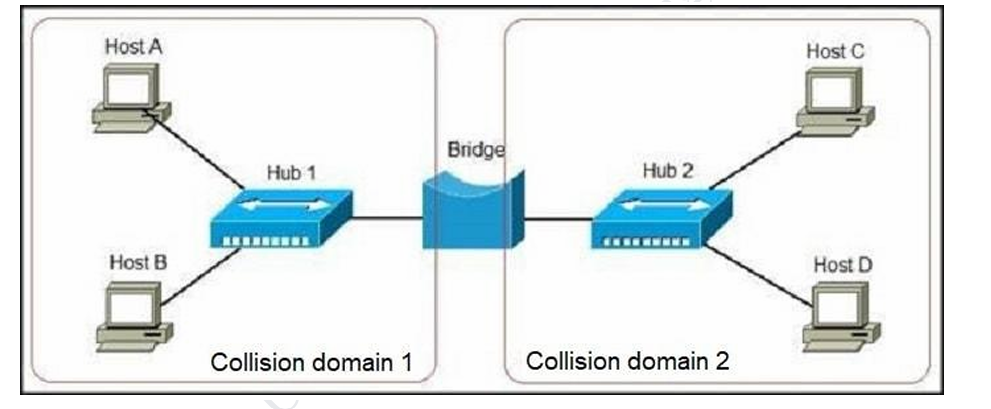
The Advantages of bridges include their ability to reduce traffic, improve performance, scale easily, and operate transparently within a network. Their disadvantages include not supporting IP routing and not being ideal for larger or more complex networks.
SWITCH
A network switch is a device used to connect multiple devices within a Local Area Network (LAN) and intelligently forward data based on MAC addresses. It operates primarily at the Data Link Layer (Layer 2) of the OSI model, although more advanced models known as multilayer switches can also function at the Network Layer (Layer 3) to
support basic routing. You might be wondering how switches differ from bridges. While a bridge connects just
two network segments, a switch connects many devices within a LAN and does so with greater speed, efficiency, and scalability. Switches provide dedicated bandwidth per device, enable full-duplex communication, support traffic filtering, and allow for VLAN configuration, making them essential in modern networks.
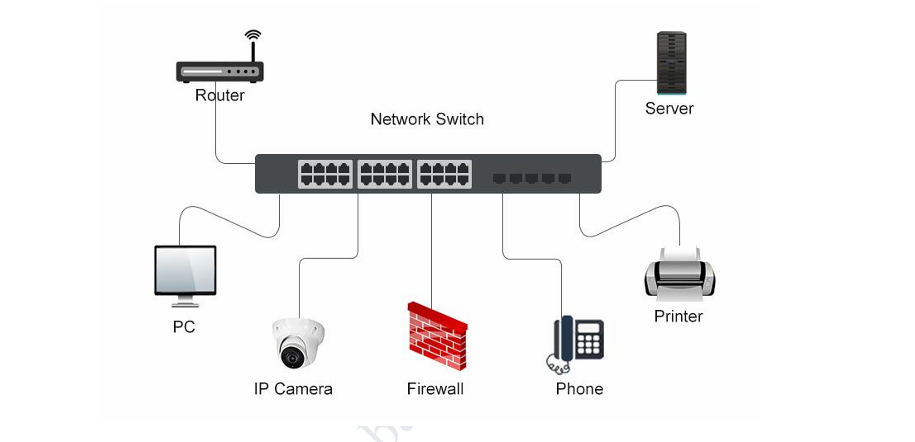
The advantages of Switches include their efficiency, high performance, scalability, improved security, and loop prevention. Their disadvantages include being more expensive than hubs, introducing additional complexity during setup, and still allowing some broadcast traffic, which can affect performance in very large or industrial environments.
ROUTERS
When we talk about routers, we’re referring to the device commonly found in homes and offices, the one that connects you to the internet. A router is a networking device that connects multiple networks and forwards data packets based on IP addresses. It operates at the Network Layer (Layer 3) of the OSI model, and enables communication between different networks, such as a Local Area Network (LAN) and the Internet.
In simple terms, your devices connect to the router, and the router connects you to the Internet. As the name suggests, it routes traffic efficiently to ensure data reaches the correct destination. Routers are known for their strong security features, support for inter-network communication, network address translation (NAT), and dynamic routing.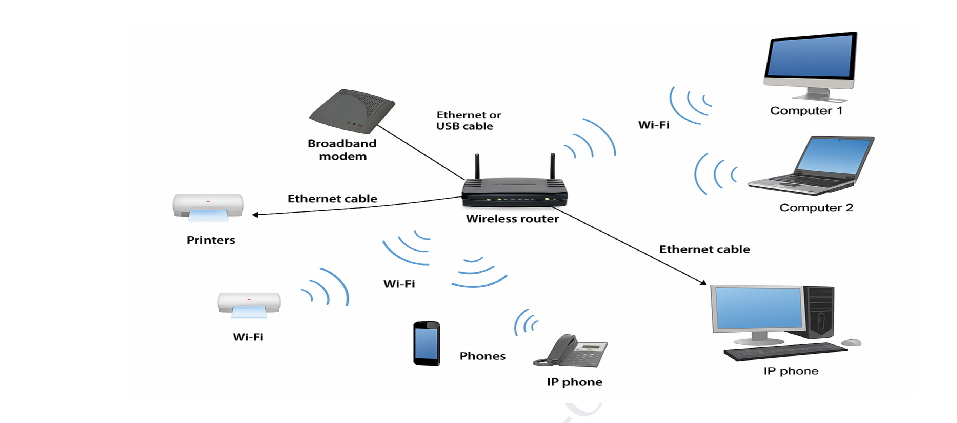 The Advantages of a Router include inter-network connectivity, optimized traffic flow, enhanced security, and scalability. Their disadvantages include higher cost, added configuration complexity, potential latency, and the risk of serving as a single point of failure in a network.
In conclusion, network devices serve as essential intermediary nodes that ensure smooth communication between end devices within a network. This documentation has equipped you with a foundational understanding of key networking devices, how they function, where they operate in the OSI model, and their practical applications. Whether you’re setting up a home network or designing one for an office, knowing how to leverage these devices will help you create efficient, secure, and scalable network environments.